How to Download Instagram Videos and Photos Quickly
Instagram is one of the most popular social networks today, with millions of new photos and videos shared every day by users around the world. However, since the app does not support direct downloads, saving your favorite moments can be a challenge. That is why ClipDown.app was born, providing a solution to help you download Instagram content to your device with just a few clicks.
ClipDown is a powerful downloader designed to help you easily download content from Instagram, including videos, photos, Stories, Reels, Highlights, and even entire profile posts. It works directly in your web browser, requiring no software installation or complicated setups. Whether you are using a smartphone, tablet, or PC, ClipDown provides a smooth, stable, and fast experience across all devices.
Simple steps to download Instagram content with ClipDown
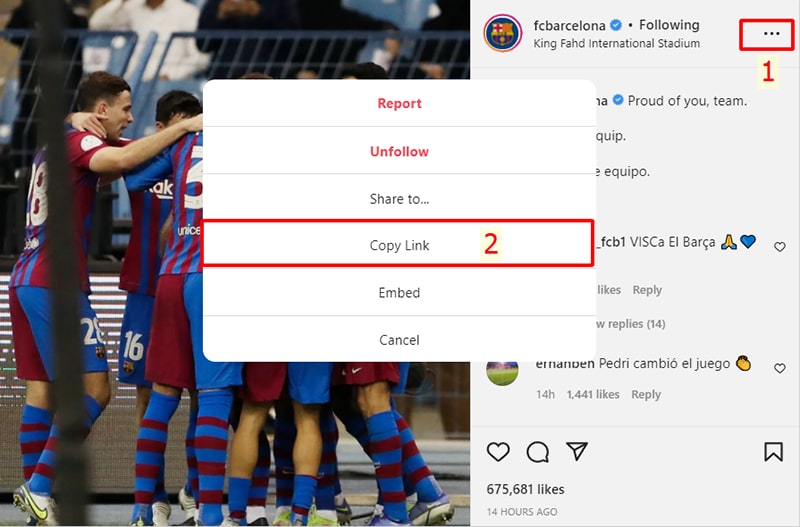
Step 1: Copy the Instagram link
Open the Instagram app, find the video or photo you love, tap the Three dots (●●●) icon and select Copy Link.
Step 2: Paste the link into ClipDown
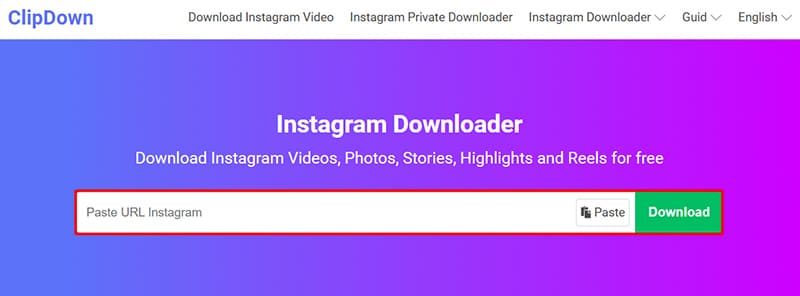
Visit the website: ClipDown.app using any web browser.
Paste the Instagram link you just copied into the input box and press the Download button.
Step 3: Save to your device
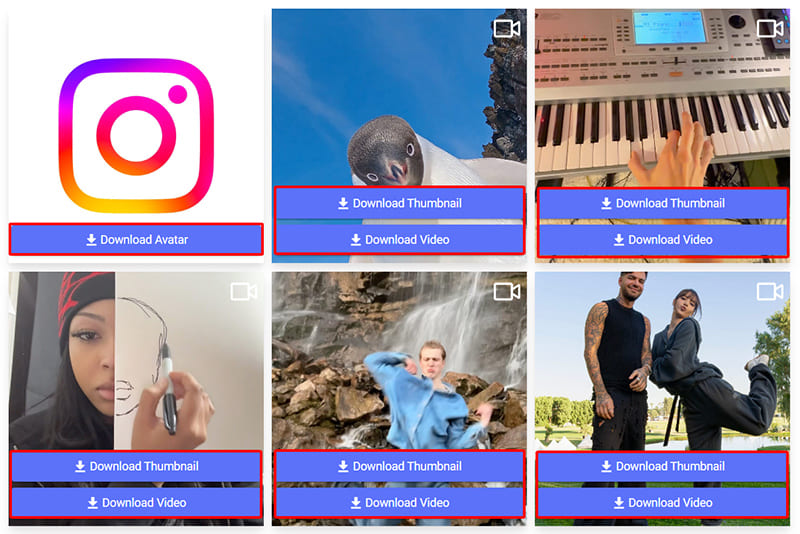
The photos and videos will appear; click Download Photo or Download Video below each file to save it to your device.
Thank you for choosing our service! If you encounter any issues or errors during use, please contact us for immediate support.